
The bottom line
For most of the last decade, the honest advice on workflow tools that had to read an invoice or classify an email was: buy it. Standing up and maintaining the model was a project in itself. Azure OpenAI changed that — the intelligence layer is now a governed service inside your own tenant, billed on consumption, with your data staying in your Azure boundary. Paired with Power Apps for the interface and Power Automate for orchestration, a lot of the tools mid-market operations teams buy are now a thin workflow wrapper you already own the licence for. Not all of them — deep, regulated or vertical software you still buy, and anything financial stays AI-drafts, human-approves. But the line moved, and the next SaaS renewal on your desk deserves a question it did not get last year.
In This Article
The Line Just Moved
Every quarter, an operations team somewhere signs a new SaaS contract to close a workflow gap. A vendor-invoice reader. An RFQ triage tool. A shift-handover app. Each one solves a real problem. Each one also adds a per-seat bill that renews forever, another integration to keep alive, and another copy of your data sitting on someone else’s servers.
For most of the last decade, I would have told you to buy it. Building that kind of tool in-house meant a developer you could not spare, a hosting bill, and — the moment you needed the software to actually read an invoice or classify an email — a machine-learning model nobody on the team could maintain six months later. The Power Platform was fine for forms and approvals. It fell over the instant you needed real document understanding.
That is the part that changed. And it changed quietly enough that a lot of operations leaders are still buying tools they could now build on the licence they already pay for.
The wall was never the interface. It was intelligence — and that wall just came down.
Why I Held the Other View
The old objection to "just build it" was never the interface. Power Apps has been good enough to capture data on a plant floor for years. Power Automate has moved data between systems and triggered approvals for just as long.
The wall was always intelligence. Reading a scanned purchase order. Deciding whether an inbound email is a complaint, an RFQ or a delivery query. Drafting a first-pass reply a supervisor can edit rather than write. Summarising a rambling shift handover into five lines the next shift can act on. That work needed a model — and standing one up, hosting it, and keeping it accurate was a project in its own right. So teams bought a specialist SaaS product that had already done that work, and paid for it monthly. Fair trade, at the time.
What Actually Changed
Three things moved, and together they shifted the line. First, Azure OpenAI made the intelligence layer a governed service inside your own tenant. You no longer train or host a model — you call one, for reading, classifying, drafting and summarising, billed on consumption, with your data staying inside your Azure boundary rather than being shipped to a third party. That single change removed the hardest part of building in-house.
Second, Power Automate grew up as connective tissue. Premium connectors reach into SAP S/4HANA, SAP ByDesign and Microsoft Dynamics 365. It reads a mailbox, calls a REST or line-of-business API, picks up an MQTT signal off the floor, and posts a result back into the system of record. It is the orchestration layer that ties the sources to the intelligence and back to an action.
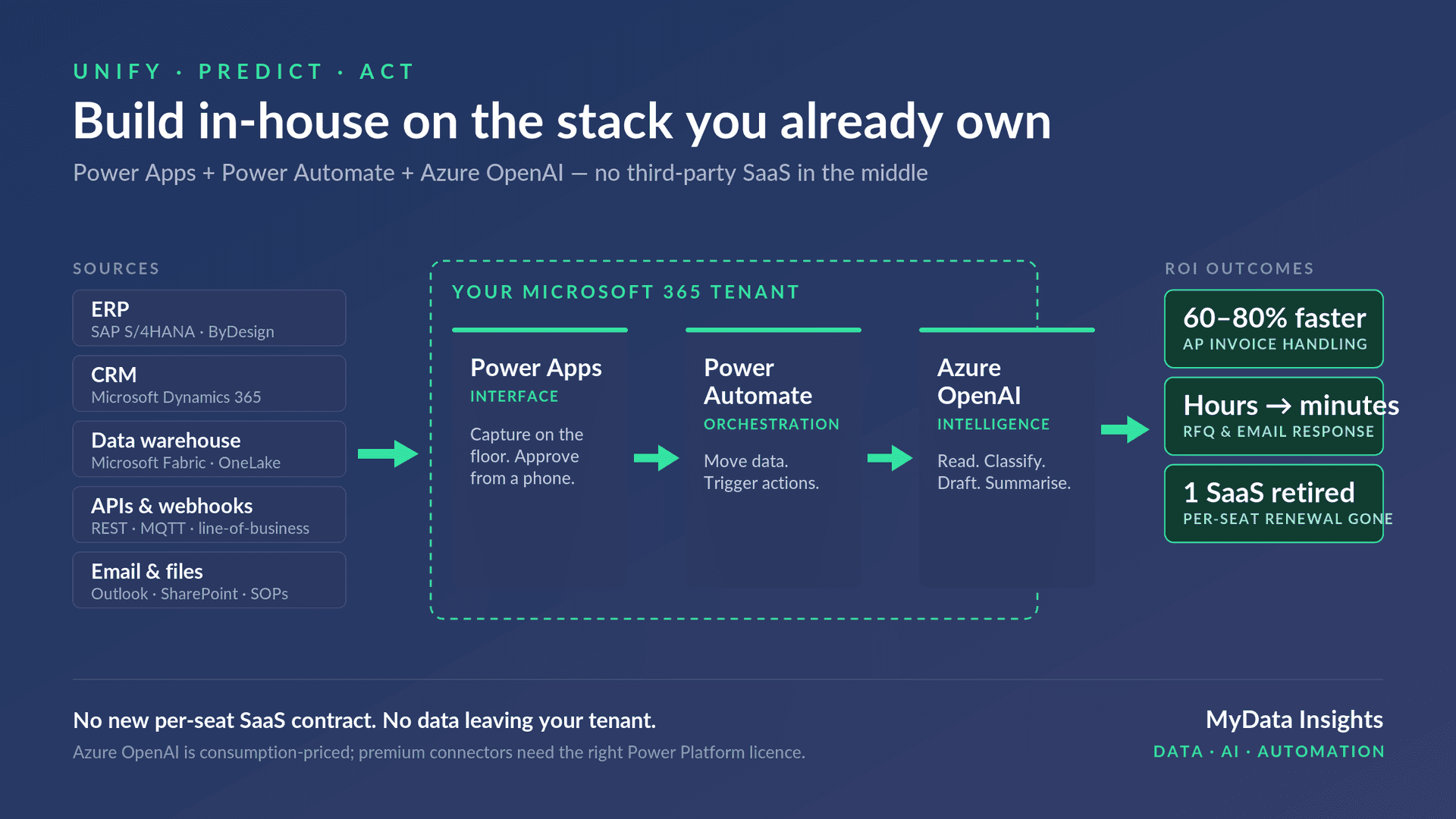
Third, Microsoft Fabric and OneLake gave the whole thing a single warehouse to stand on. When your ERP, CRM and operational feeds land in one governed lakehouse, the AI reads from a version of the data you can actually trust — not seven disconnected extracts. Put those together and the picture is simple. Your existing systems on the left. A build inside your tenant in the middle — Power Apps for the interface, Power Automate for orchestration, Azure OpenAI for the intelligence. A measurable outcome on the right. No third-party platform in the middle. No new per-seat contract.
You no longer train or host a model. You call one — on consumption pricing, inside your own tenant, with your data never leaving it.
What It Looks Like on a Real Estate
Take a mid-market manufacturer or FMCG business. The estate is usually some version of this: SAP S/4HANA or SAP ByDesign for the ERP, Dynamics 365 for CRM, a Fabric and OneLake warehouse (or the beginnings of one), a handful of REST and MQTT feeds from the floor and from line-of-business apps, and the daily reality of Outlook, SharePoint and a pile of SOPs. Here is what a build looks like end to end.
Accounts-payable invoice handling. A supplier invoice lands in a shared mailbox. Power Automate picks it up. Azure OpenAI reads the document, extracts the line items, and matches them against the purchase order in SAP. Power Automate posts a draft for approval, and the AP clerk approves or corrects from a Power App on their phone. What was eight minutes of manual keying per invoice becomes a check-and-approve. In the builds I have seen, that is a 60–80% reduction in handling time — though your number depends on invoice volume and how clean your PO data is.
RFQ and email triage. Inbound mail hits sales or customer service. The AI classifies each message — RFQ, complaint, delivery query, noise — and drafts a first response the team can edit and send. Response time moves from next-day to same-hour. The team stops triaging and starts replying.
Shift handover. Supervisors capture notes in a Power App on the floor. At handover, the AI summarises the shift into a short, structured brief for the incoming team. Thirty minutes of writing-up and reading becomes five. None of these is exotic. Each is a thin workflow wrapped around reading, routing and drafting — exactly the shape that used to require a bought tool and now does not.
Each build is a thin workflow wrapped around reading, routing and drafting — the parts you already own inside your Microsoft tenant.
The honest caveats
This is the part the enthusiastic version of this article leaves out. Build-in-house is the right call more often than it used to be. It is not always the right call.
It is not free. Azure OpenAI is consumption-priced, and at real document volume that bill is not trivial. Premium Power Platform connectors and per-app or per-user licences carry a cost too. What you avoid is a fourth SaaS vendor and a fifth integration — not spend altogether. Model the run cost before you commit, not after.
Governance is a genuine risk, not a footnote. The same ease that lets you build fast lets everyone build fast. Without proper environments, application lifecycle management and data-loss-prevention policies, you trade a SaaS bill for a sprawl of unmanaged citizen-developer apps nobody owns. That is a worse problem. If you build, build with governance from day one.
Anything financial needs a human in the loop. These models draft and extract well. They also get things wrong with complete confidence. For invoice posting, credit notes, anything that touches the ledger — the pattern is AI-drafts, human-approves. Never AI-decides. And deep, regulated or vertical software you still buy: a full warehouse management system, a transport management system, a validated MES on a regulated line are not workflow wrappers. Do not build what a specialist vendor has spent a decade hardening. The line moved; it did not disappear.
And none of it works on a broken foundation. If your data is not unified — if the AI is reading from stale, contradictory extracts — you will automate the production of confident nonsense. Unify the data first. Predict and act second. In that order, always.
Most of the time, the "we need an AI tool" conversation turns out to be a data-foundation conversation wearing a different costume.
So What, If You Are the One Signing the Contract
You do not need to build everything. That is not the point. The point is that the build-vs-buy line has moved, and the next SaaS renewal on your desk deserves a question it did not get last year: is this a specialist product, or is it a thin workflow wrapper around reading, routing and drafting — the parts I already own inside my Microsoft tenant?
| Build in-house (thin workflow wrappers) | Still buy (deep, regulated or vertical) |
|---|---|
| AP invoice reading and PO matching | Full warehouse management system (WMS) |
| RFQ and email triage with drafted replies | Transport management system (TMS) |
| Shift-handover summarisation | Validated MES on a regulated line |
For a lot of the tools mid-market operations teams buy, the honest answer is the second one. Not all. But more than you would expect. If you have got a workflow in mind — an AP bottleneck, an inbox nobody can keep up with, a handover that eats an hour a day — it is worth thirty minutes to pressure-test whether it is a build or a buy.
The build-vs-buy line has moved, quietly, and most operations teams have not repriced their tooling against it. You do not need to build everything — but the next renewal on your desk is worth one honest question: specialist product, or thin workflow wrapper around reading, routing and drafting? Unify the data first, then decide. More often than you would expect, the tool you were about to buy is one you already own the licence to build.
Free Assessment
Where does your operation sit on the data maturity curve?
8 questions. 3 minutes. You get a scored breakdown across data infrastructure, analytics readiness, and automation potential — with a specific next step for your industry.