
The bottom line
A Fabric migration is a data modernisation programme, not a lift-and-shift. This 8-stage framework — Assess, Discover, Architect, Prioritise, Migrate, Validate, Optimise, Govern — decides what to migrate, modernise, rebuild, consolidate or retire before anything moves, reconciles every number after, and builds governance into the target from day one. The rule that runs through it: don't migrate everything. Modernise what matters. Retire what doesn't. Build for the future.
In This Article
A Fabric migration is not a copy job
Microsoft Fabric migration is not simply moving data, pipelines and Power BI reports from one platform to another.
For an estate built on Azure Data Factory, Azure Synapse, SQL Server, Databricks, Azure Data Lake, Snowflake or a spread of BI tools, a Fabric migration is a chance to simplify the architecture, modernise analytics, cut technical debt, tighten governance and build a stronger foundation for AI. Treat it as a lift-and-shift and you carry every existing problem into a new bill.
That is why we run Fabric migration as a business-led modernisation programme, not a technology conversion. The framework below gives it structure: assess the estate, define the target, decide what actually moves, migrate or rebuild, prove the numbers, then optimise and govern.
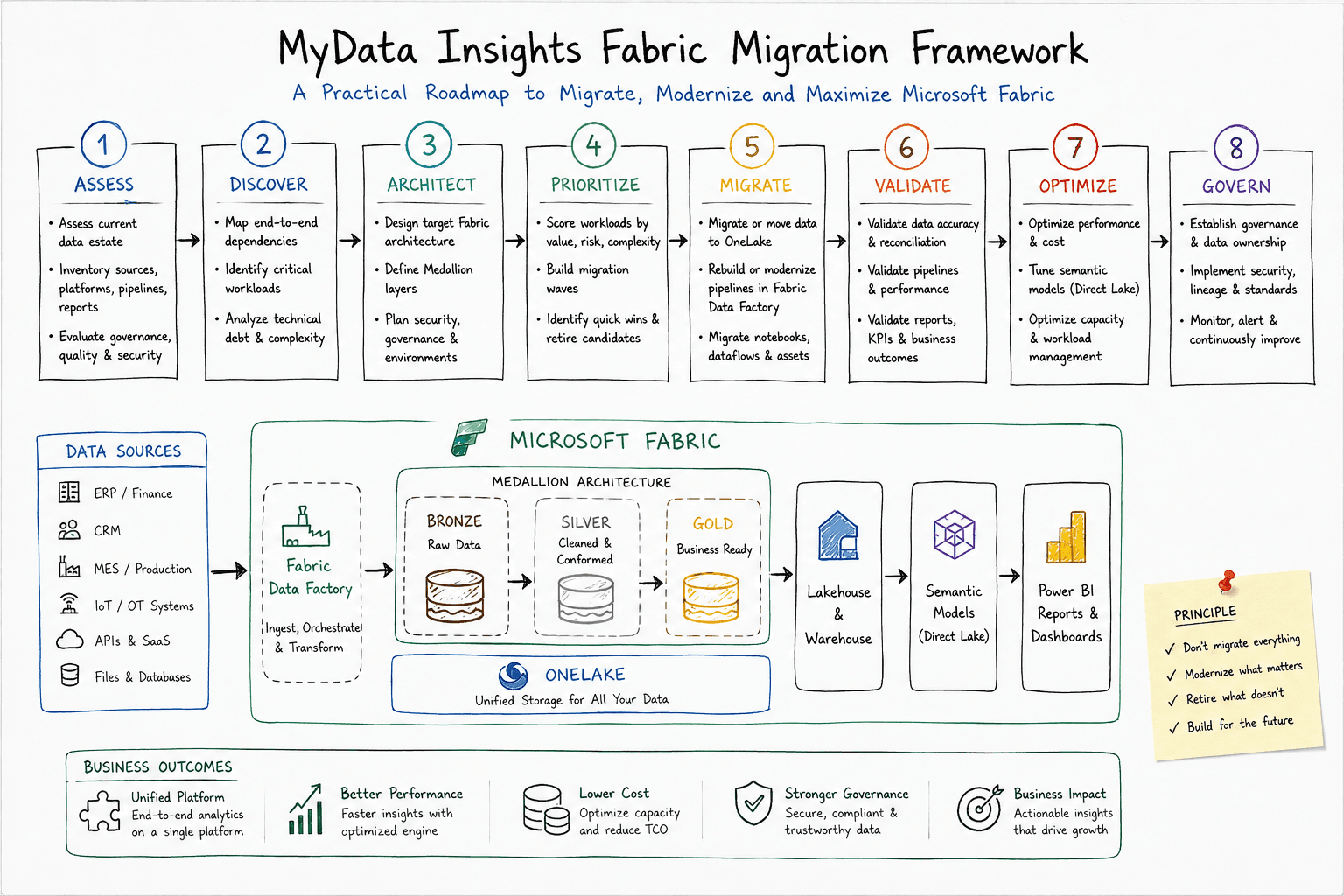
What the framework is
The MyData Insights Fabric Migration Framework is an eight-stage method for moving from legacy or fragmented data platforms to a modern Microsoft Fabric architecture: Assess, Discover, Architect, Prioritise, Migrate, Validate, Optimise, Govern.
The principle behind it is deliberately blunt: don't migrate everything. Modernise what matters. Retire what doesn't. Build for the future.
It earns its keep on complicated estates — the ones running some mix of Azure Data Factory, Azure Synapse, SQL Server, Azure SQL, Azure Data Lake, Databricks, Snowflake, Power BI, SSIS and Excel reporting on top of ERP, CRM and MES. Microsoft's own migration guidance points the same way: assess, analyse compatibility, migrate in phases and validate — not a one-click conversion.
Don't migrate everything. Modernise what matters. Retire what doesn't. Build for the future.
Why estates end up needing this
Most enterprise data architectures grow by accretion, not design. A business starts with ERP into SQL Server into SSIS into Power BI. Then adds ADF, a data lake and Synapse. Then a Databricks workspace with notebooks and Delta. Each layer solved a real problem at the time.
The residue is familiar: multiple copies of the same data, overlapping pipelines, duplicated transformations, lineage nobody can trace, inconsistent KPIs, slow reports, rising platform cost and governance that is hard to enforce.
Microsoft Fabric offers an integrated analytics environment around OneLake — data integration, engineering, warehousing, real-time intelligence, data science and Power BI on one platform. So the opportunity is not really "move to Fabric". It is "redesign the estate around a more integrated operating model", and use the migration as the forcing function.
01 — Assess: understand before you migrate
Before deciding what to migrate, establish what actually exists. Guesswork here is what turns migrations into overruns.
We inventory four things. Data sources — ERP, CRM, MES, finance, HR, IoT and OT, APIs, SaaS, files and operational databases. Platforms — SQL Server, Azure SQL, Azure Synapse, Azure Data Lake, Databricks, Snowflake and any on-premises systems. Integration — ADF and Synapse pipelines, SSIS packages, dataflows, stored procedures, notebooks, custom ETL, APIs and scheduled jobs. Analytics — Power BI reports, semantic models, paginated reports, Excel reporting and embedded analytics.
The output is a current-state data-estate assessment: what you own, how it works, who depends on it and where the technical debt sits.
02 — Discover: map dependencies and business criticality
An inventory lists parts; it does not show how they connect. The next step traces the chains.
A single table can look unused in isolation and turn out to feed the board's financial pack. So we map the full path — source to pipeline to storage to transformation to semantic model to report to business process — and classify each workload by business criticality, usage, complexity, dependencies, data volume, performance, technical debt, security needs and migration risk.
The output is a migration dependency map and a scored workload inventory — the evidence base for every later decision.
03 — Architect: design the future state
With the current estate understood, we design the target. A typical Fabric shape runs sources — ERP, CRM, MES, IoT, APIs, SaaS, databases — into Fabric Data Factory, landing in OneLake across a Bronze, Silver and Gold medallion, then into a Lakehouse or Warehouse, semantic models and Power BI.
There is no single Fabric architecture that fits everyone. The target depends on data volume and latency, workload type, SQL versus Spark versus BI needs, security, governance, existing investments and business priorities.
For most analytical workloads the medallion architecture gives a controlled path from source to trusted insight: Bronze holds raw, source-aligned data; Silver holds cleansed, standardised, integrated data; Gold holds business-ready analytical data. Design the layers deliberately — this is where trust is built or lost. It is the same layered logic we set out in our enterprise data architecture framework.
04 — Prioritise: decide what actually moves
This is the stage that saves the budget. Not every workload deserves to be migrated, and migrating technical debt just relocates it.
Each workload is scored against a handful of questions.
| Factor | Key question |
|---|---|
| Business value | How important is this workload? |
| Complexity | How hard is it to migrate? |
| Risk | What happens if the migration fails? |
| Technical debt | Is the existing solution already causing problems? |
| Performance | Can Fabric improve it? |
| Cost | Does the future architecture improve the economics? |
| Strategic value | Does it support the future data strategy? |
That score sorts every workload into one of five verdicts:
- Migrate — move with limited architectural change
- Modernise — move while improving the architecture
- Rebuild — redesign using Fabric-native capabilities
- Consolidate — combine duplicate or overlapping workloads
- Retire — remove obsolete or unused assets
Done honestly, this stage stops a team spending months and real money carrying dead weight into a new platform.
05 — Migrate: move data, pipelines and workloads
Implementation begins here — and the approach changes by workload, because migration is not copy.
For Azure Data Factory to Fabric Data Factory, Microsoft's guidance separates workloads that migrate with continuity, workloads with a guided upgrade path, and complex workloads that need manual migration or redesign. A simple ADF pipeline may move with limited change; a complex one may need refactoring, new transformation logic, connection and parameter changes, gateway and security changes, and a rebuilt monitoring setup. Mapping Data Flows, for instance, do not map one-to-one to Dataflow Gen2 — so assessment and refactoring matter. Every pipeline gets a verdict: reuse, translate, redesign, rebuild or retire.
Azure Synapse to Fabric is rarely one workstream. Depending on the estate it spans Synapse pipelines, Spark notebooks and job definitions, Spark pools, lake databases, metadata, security, data access, libraries and configuration. Microsoft's Synapse-to-Fabric guidance is clear that Spark migrations can require code refactoring, configuration changes, metadata migration and post-migration validation.
The discipline is the same in both cases: assess, adapt, test, validate, then cut over. Never a blind copy.
A pipeline that runs is not a migration that worked. Migration means: assess → adapt → test → validate → cut over.
06 — Validate: prove the numbers
A pipeline completing successfully is not a successful migration. The migrated environment has to produce trusted results, and validation runs at four levels.
Data — reconcile record counts, aggregations, nulls, duplicates, data types, history and business keys. Pipeline — check execution time, failure rates, scheduling, incremental loads, error handling and dependencies. BI — compare measures, KPIs, filters, drilldowns, report outputs, semantic models and row-level security. Business — the real test: does the new platform produce the same or better business outcomes?
Concretely: if the old system reported production at 125,400 units and Fabric reports 123,850, the migration is not done until that variance is explained. A number that moved without a reason is a number nobody will trust — and trust is the whole point.
07 — Optimise: migration is not the finish line
Once workloads run in Fabric, the tuning starts. Three fronts.
Performance — data model design, query performance, DAX, Lakehouse structures, Warehouse workloads, table optimisation, semantic models and refresh patterns. Capacity — consumption, workload patterns, peak usage, refresh schedules, background workloads and underused resources. Cost — where the aim is not simply lower consumption but the most business value per unit of Fabric capacity.
In practice that means removing needless refreshes, consolidating workloads, cutting duplicate data, improving transformation efficiency, scheduling heavy jobs off-peak and retiring assets nobody uses.
08 — Govern: build the operating model in
Governance designed in after go-live is governance bolted on. It belongs in the target architecture from the start.
Security — workspace access, role-based access, data permissions, row-level security and sensitive-data controls. Data governance — ownership, classification, quality, a business glossary and lineage. Development governance — naming standards, a workspace strategy, dev/test/production separation, deployment processes, version control and release management. Operational governance — monitoring, alerting, SLA management, data-quality monitoring and incident management.
The output is a repeatable Fabric operating model, not just a platform that happens to be migrated.
A manufacturing example
Take a manufacturer running ERP, MES and CRM into ADF, landing in SQL Server and a data lake, transformed through stored procedures and views, surfaced in Power BI and finished in Excel. It works — until growth turns the seams into bottlenecks.
A Fabric modernisation re-lays the foundation: ERP, MES, CRM and IoT into Fabric Data Factory, into OneLake, through a Bronze/Silver/Gold medallion, then Lakehouse and Warehouse, semantic models and Power BI.
That gives one connected base for production, OEE, quality, inventory, supply chain, maintenance, plant performance and finance — instead of a separate island of reports for each function. The engineering is shared; the analytics stop contradicting each other.
A Fabric migration is also a Power BI reset
A common mistake is to migrate the data platform and leave the BI architecture untouched — which preserves the very problems you were trying to fix.
Use the migration to review the semantic models, dataset duplication, DAX performance, import versus Direct Lake, report sprawl, data-model design, security, refresh architecture and KPI definitions.
For suitable workloads, Direct Lake offers a different route to semantic-model access — working against data in OneLake rather than the traditional import pattern — and Microsoft positions it specifically for Power BI semantic models over Fabric data. The rule of thumb is simple: don't migrate yesterday's BI architecture unchanged into tomorrow's platform.
When a Fabric migration assessment is worth it
A migration assessment tends to pay for itself when the estate is showing strain: rising Azure platform complexity, heavy ADF or Synapse maintenance, multiple data copies, slow Power BI, fragmented analytics, hard governance, climbing cost, legacy ETL, duplicate semantic models, trouble scaling, or growing AI requirements. It is also useful when a business has already bought into Fabric but does not know how to move existing workloads without disrupting operations.
Before committing to a large programme, an assessment should answer five things clearly. Current state — what sources, platforms and business-critical workloads exist. Readiness — which workloads are Fabric-ready, which have compatibility gaps, which need redesign. Target state — what the Fabric architecture, Lakehouse/Warehouse split and semantic layer should be. Roadmap — what moves first, what runs in parallel, what retires. Business case — the value created, the debt eliminated, where performance improves and where complexity falls.
The outcome: a modern platform, not just a new tool
The goal is not to let a team say "we migrated to Microsoft Fabric". It is to let them say "we now have a simpler platform we can actually govern and scale".
A migration done this way should move six needles: a simpler, more integrated architecture; more maintainable pipelines and transformations; faster, more trusted analytics; clear ownership, security and lineage; better monitoring with less operational complexity; and a stronger foundation for decisions, AI and growth.
The whole method reduces to one line per stage: Assess the estate, Discover the dependencies, Architect the target, Prioritise what moves, Migrate in waves, Validate the numbers, Optimise the platform, Govern the operating model.
A Fabric migration should end with a platform you can govern and scale — not just a logo change on the architecture diagram.
Migrating to Microsoft Fabric is an architectural decision, not a tooling swap — so the right first move is a clear read of your current state and the strategy that follows from it. Book a Fabric migration assessment with Amit — no slides, no pitch deck, no obligation to proceed. You will leave knowing what to migrate, what to modernise, what to retire, and what the target should look like.
Free Assessment
Where does your operation sit on the data maturity curve?
8 questions. 3 minutes. You get a scored breakdown across data infrastructure, analytics readiness, and automation potential — with a specific next step for your industry.